- Details
-
Category: Latest
-
Published on Friday, 08 October 2010 19:08
-
Hits: 52
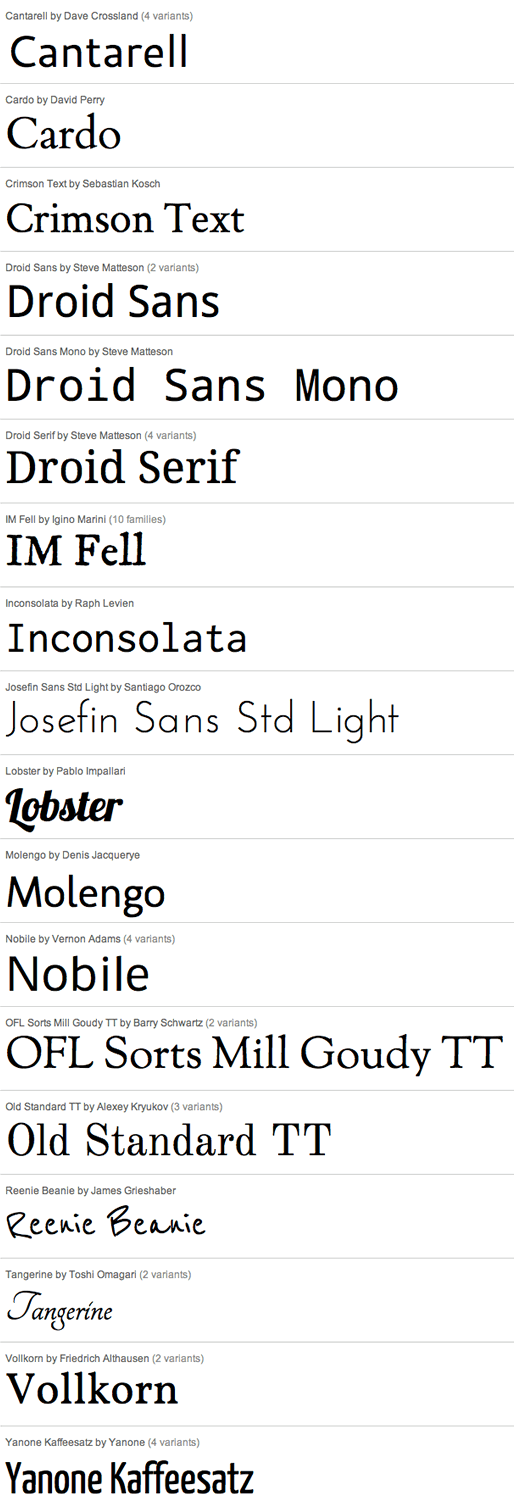
Do you want your own custom font? Not a problem, this template comes with Google Fonts enabled, allowing you to pick from over a dozen font families for your website. In the template parameters area of the template you can choose from the below fonts:
- Details
-
Category: Latest
-
Published on Friday, 13 August 2010 18:57
-
Hits: 91
Custom Highlight Color
Need your own custom color? Not a problem, this template allows you to set your own custom highlight color to any color you wish. Simply picking one custom color will modify titles, hyperlinks, menu items, and several other elements. This color can easily be set in the template configuration area.. Below are several example screenshots of the custom highlight feature.
Custom Highlight Color Examples:


- Details
-
Category: Latest
-
Published on Thursday, 11 February 2010 17:28
-
Hits: 115
SEO - Get your site noticed!
Not only is this template beautifully designed but it is great for search engine optimization as well! What is SEO? It is simple the act of altering a web site so that it does well in the organic, crawler-based listings of search engines such as google.com. How does this template accomplish this? It's simple, the majority of your most valuable content is found in the main body of your site, through css we are able to alter the layout of the site and call the main content before the left and right columns are called. This allows for your content to be found first by search engines before it reaches your other content, which is vital in search engine optimization. This is a common feature this can be done with almost all of Shape 5 templates as well.
- Details
-
Category: Latest
-
Published on Friday, 13 August 2010 18:18
-
Hits: 99
Features:
- Supports a range of multimedia formats: images, flash, video, mp3s, html!
- Auto detects formats or you can specify the format
- Html descriptions
- Enable/Disable page overlay when multibox pops up (via template parameters)
- Enable/Disable controls (via template parameters)
Images Example

Image #1. It can support html.

Image #2. It can support html.

Image #3. It can support html.
To enable use the following around any group of images:
<a href="http://www.shape5.com/demo/images/multibox1_lrg.jpg" id="mb2" class="s5mb" title="Grouped Image Example #1:">
<img src="http://www.shape5.com/demo/images/multibox1.jpg" class="boxed" alt="" />
</a>
<div class="s5_multibox mb2">Multiple Image #1. It can support <strong>html</strong>.</div>
<a href="http://www.shape5.com/demo/images/multibox2_lrg.jpg" id="mb3" class="s5mb" title="Grouped Image Example #2:">
<img src="http://www.shape5.com/demo/images/multibox2.jpg" class="boxed" alt="" />
</a>
<div class="s5_multibox mb3">Multiple Image #2. It can support <strong>html</strong>.</div>
<a href="http://www.shape5.com/demo/images/multibox3_lrg.jpg" id="mb4" class="s5mb" title="Grouped Image Example #3:">
<img src="http://www.shape5.com/demo/images/multibox3.jpg" class="boxed" alt="" />
</a>
<div class="s5_multibox mb4">Multiple Image #3. It can support <strong>html</strong>.</div>
Video Example:
Youtube.com Video - CLICK ME
UP: Carl and Ellie
You can use the following video formats: flv, mov, wmv, real and swf. Just insert the URL to the videos in the href of the hyperlink, here is an example of how we did this for a Youtube video:
<a href="http://www.youtube.com/v/VGiGHQeOqII" id="youtube" class="s5mb" title="Youtube.com Video">
Youtube.com Video - CLICK ME
</a>
<div class="s5_multibox youtube">UP: Carl and Ellie </div>
YouTube Tutorial: Simply right click on a youtube video and copy the embed code, then paste into a text editor and look for the embed src and use that URL in your hyperlink.
<embed src= http://www.youtube.com/v/VGiGHQeOqII
MP3 Example:
MP3 example - CLICK ME
mp3 example
<a href="http://www.shape5.com/demo/images/music.mp3" id="mb8" class="s5mb" title="Music">MP3 example</a>
<div class="s5_multibox mb8">mp3 example - CLICK ME</div>
iFrame:
iFrame/HTML Example - CLICK ME
Google.com
<a href="http://www.google.com" rel="width:790,height:600" id="mb28" class="s5mb" title="Google.com">iFrame/HTML Example - CLICK ME</a>
<div class="s5_multibox mb28">Google.com</div>
- Details
-
Category: Latest
-
Published on Saturday, 06 February 2010 23:35
-
Hits: 1001
Lorem ipsum dolor sit amet, consectetur adipiscing elit. Donec sit amet nibh. Viva mus non arcu. Lorem ipsum dolor sit amet, consectetur adipiscing elit. Etiam dapibus, tellus ac ornare aliquam, consectetur adipiscing elit. id faEtiam dapibus, sit ame tellus a ucibus. tristique urna, id faucibus lectus erat ut pede. Maecenas varius neque nec libero laoreet faucibus. id faEtiam dapibus, tellus a ucibus. Donec sit amet nibh. Viva mus non arcu. Lorem ipsum dolor sit amet, consectetur. Donec sit am et nibh. Viva mus arcu. Lorem ipsu.
Read more: Sample Article

 HomeReturn Home
 ProfilTools and Modules
 JurusanAdvanced Menu System
 Drop Down MenuUnlimited Level Options
 Menu Module ExamplePublish Any Module to Any Menu
 Grouped Child MenuGroup Children Together
 MediaWhat's Included
 Shape 5 Vertex FrameworkPowerful Site Building Blocks
 Template FeaturesPowerful Template Settings
 J! StuffDefault Joomla Items
 Style and Layout OptionsCustomize Your Site
 Kontak KamiFind Help Here